
Capture
Open KoalaShot and capture the complete vertical page, not just the visible viewport.
 KoalaShot
Full-page screenshot for your browser
Capture a full vertical webpage, redact sensitive details, and copy or save the PNG. Free, open source, and processed entirely on your device.
Simple by design
KoalaShot scrolls through the current page, captures each viewport, and stitches the sections into one vertical image. Choose your output before capture. A completed original remains available while the popup stays open.
Open KoalaShot and capture the complete vertical page, not just the visible viewport.
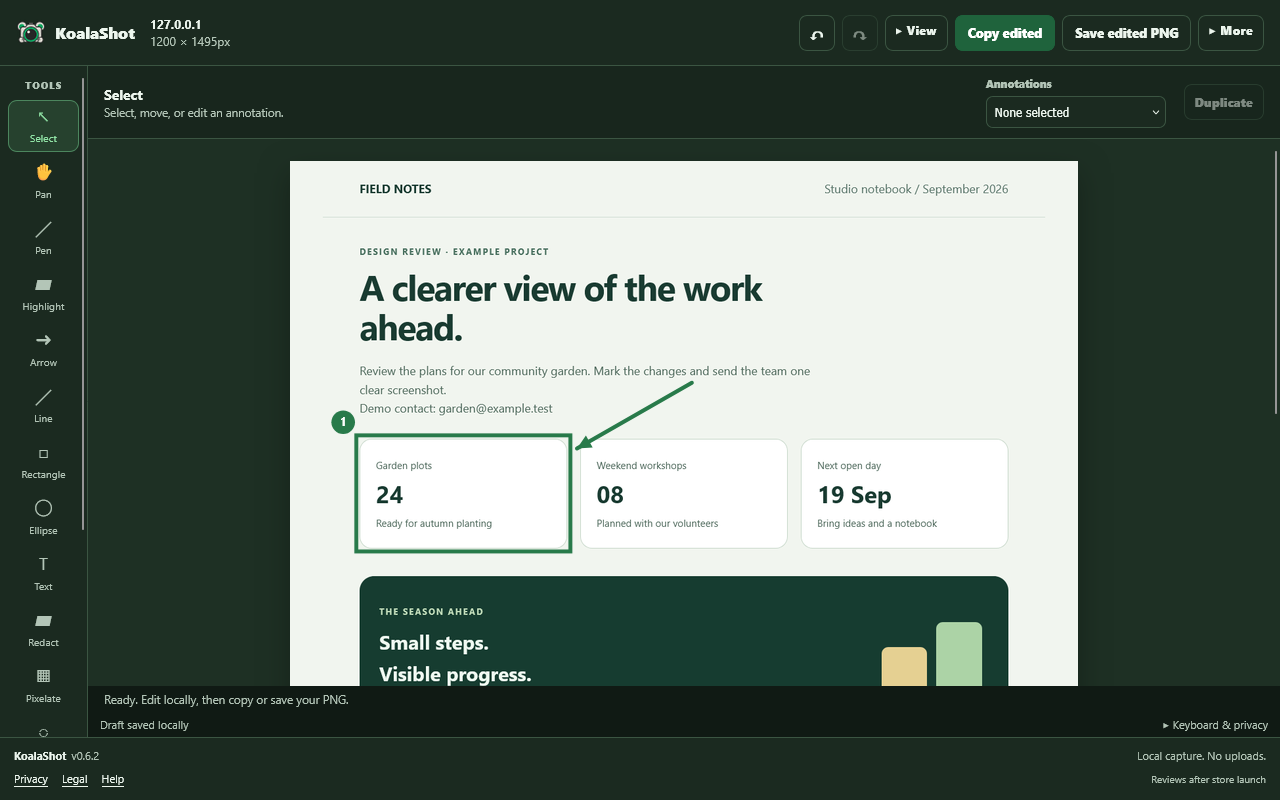
Capture & edit opens the local editor before any export. Crop, annotate, and use opaque Redact for sensitive details. Blur and pixelation are cosmetic.
Export your edited PNG. Need the untouched original? Capture & copy and Capture & save go directly to their destination without opening an editor.
Inside the editor
Add arrows, highlight a detail, crop the page and export your PNG. Every edit stays in your browser.
Privacy first
KoalaShot has no account system, upload pipeline, analytics, or remote configuration. Processing happens in the browser after an explicit action.
Designed for Chrome and Chromium-based browsers such as Vivaldi, Edge, and Brave. Desktop Manifest V3 build. Store availability is shown here when the listing is approved; other Chromium browsers require separate compatibility testing.
Separate desktop build for Firefox 142 or later. Store availability is shown here when the listing is approved.
Readable vanilla HTML, CSS, JavaScript, and Python build tooling live in the public repository.
Chrome: official listing link not yet configured.
Firefox: official listing link not yet configured.
Follow releases on GitHub for published builds and installation instructions.
Questions
No. Capture, stitching, clipboard operations, and temporary editor storage are local browser operations.
Normal document scrolling is supported by default. The popup can also capture the largest fully visible vertical scroll area inside a page. Browser-protected pages, partially off-screen roots, and horizontal stitching remain unsupported.
The local editor supports pen, highlighter, arrows, lines, rectangles, ellipses, multiline text, secure opaque redaction, cosmetic pixelation and blur, numbered markers, crop, selection, movement, undo/redo, zoom, pan, and edited PNG copy/save.
Official installation and review links appear separately for each browser when its listing is configured. See Browser store availability above for the current links. GitHub provides builds and installation instructions in the meantime.